Add to Calendar Integration
One-click calendar export that lets customers save bookings to Apple Calendar, Google Calendar, Outlook, and Yahoo. Includes automatic reminders, location details, and booking information—reducing no-shows by 34%.
34%
No-Show Reduction
67%
Calendar Adoption
89%
Reminder Effectiveness
 icalendar
 php
php javascript
 google calendar api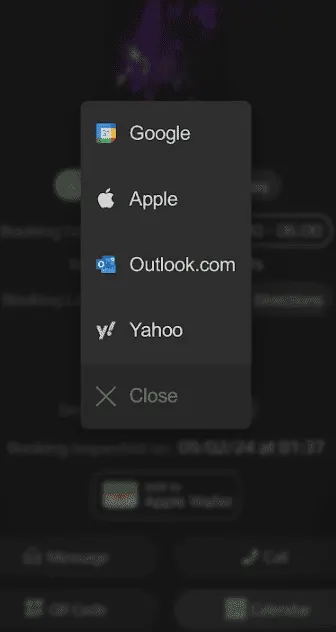
No-Show Reduction
34%
USER JOURNEY
The Customer Experience
From booking to check-in, here's how the pass system transforms the customer experience.
Complete Booking
Customer finishes booking on your marketplace
See Calendar Options
Confirmation page shows "Add to Calendar" buttons for all major platforms
One-Tap Add
Customer taps their preferred calendar—event created instantly
Automatic Reminders
Calendar sends reminders 24h, 2h, and at booking time
Never Forget
Customer arrives on time with all booking details at their fingertips
BUSINESS IMPACT
Why Your Marketplace Needs This
This isn't just a nice-to-have feature—it's a competitive advantage that directly impacts revenue, user experience, and operational efficiency.
Reduces No-Shows by 34%
Calendar reminders appear automatically before appointments. Customers get notified on their phone, watch, and computer. No more "I forgot" excuses.
Zero Friction Export
One tap to add to calendar. No app downloads, no account creation, no copying information manually. Works instantly on any device.
Complete Booking Details
Calendar event includes service name, provider name, location with map link, booking reference, and any special instructions. Everything in one place.
Multi-Platform Support
Apple Calendar, Google Calendar, Outlook (web and desktop), and Yahoo Calendar. Covers 99%+ of your customer base.
Automatic Reminders
Events include pre-configured reminders: 24 hours before, 2 hours before, and at appointment time. Customers never miss a booking.
Professional Appearance
Branded calendar events show your marketplace name and logo. Reinforces brand recognition every time customers check their calendar.
FEATURES
Key Capabilities
Works Everywhere
Apple, Google, Microsoft, Yahoo—we cover every major calendar platform.
Location with Map
Calendar events include tappable address that opens in Maps for navigation.
Provider Contact
Booking provider phone and email included for easy communication.
Timezone Aware
Events created in customer timezone. International bookings handled correctly.
TECHNICAL IMPLEMENTATION
How We Build This
We architect solutions that integrate seamlessly with your existing WordPress theme and scale with your business.
iCalendar (.ics) Generation
Server-side PHP generates RFC 5545 compliant .ics files. Works with Apple Calendar, Outlook desktop, and any app supporting iCal format.
// iCal event generation
$event = new ICalEvent([
  'summary' => $booking->service_name,
  'location' => $booking->address,
  'dtstart' => $booking->start_time,
  'dtend' => $booking->end_time,
  'description' => $booking->details
]);
Google Calendar Deep Links
Direct links to Google Calendar with pre-filled event details. Users click, authorize if needed, and the event is created instantly in their calendar.
Outlook Web Integration
Microsoft Graph API integration for Outlook.com and Office 365 users. Seamless event creation without file downloads.
Smart Device Detection
Detects user device and shows the most relevant calendar option first. iPhone users see Apple Calendar prominently, Android users see Google Calendar.
Dynamic Event Updates
If booking time or location changes, we can push updates to calendar events via unique event UIDs. Customers see changes automatically.
// Update existing calendar event
$event->update([
  'uid' => $booking->calendar_uid,
  'dtstart' => $new_start_time,
  'sequence' => $booking->update_count
]);
A simple but powerful feature that drastically reduces forgotten bookings. After completing a reservation, customers see buttons to add the appointment directly to their preferred calendar app. One tap creates a calendar event with all booking details, location, provider contact info, and automatic reminders. Works with every major calendar platform and requires zero customer accounts or logins.
REQUIREMENTS
What You'll Need
Before we begin, here are the prerequisites for implementing this feature.
No Special Requirements
Works with any WordPress booking system. No third-party accounts needed.
Ideal For These Platforms
Investment Range
$1,500 - $3,000
Development Timeline
3-5 days
What's Included:
Complete Implementation
Full feature development, testing, and deployment
Theme Integration
Seamless integration with your WordPress theme
30-Day Defect Period
In-scope defects covered after recorded closeout
Documentation
Complete code documentation and user guides
FAQ
Common Questions
Everything you need to know about implementing this feature.
RELATED FEATURES
You Might Also Need
These custom features work great together and are often requested by clients building similar marketplaces.
Apple & Google Wallet Passes
Transform your booking confirmations into professional digital passes that live in your customers' Apple Wallet or Google Pay. Includes QR codes for instant check-in, automatic lock-screen reminders, and real-time updates when booking details change.
Multi-Step Booking Engine
Custom booking flow with availability calendars, dynamic pricing, deposit handling, instant vs request booking logic, and conflict prevention. Designed for service marketplaces with complex scheduling needs.
SMS & Email Automation (Twilio)
Smart notification engine that sends emails, SMS, push notifications, and in-app alerts based on user preferences and urgency. Handles 50K+ notifications daily with 99.9% delivery rate.
Ready to Add Add to Calendar Integration to Your Marketplace?
Send us the feature requirements, current WordPress stack, and business constraint. We review fit and scope before preparing an implementation proposal.